Using Google Keep as an organizational system.
If your student is interested in adopting an electronic system to keep track of short term tasks and to-dos, Google Keep is a great option. Keep, is a free app included in the Google suite, requires minimal set-up and is easy accessible from a phone or laptop. Students describe Keep as a simple and approachable way to keep track of what they need to do for their classes.
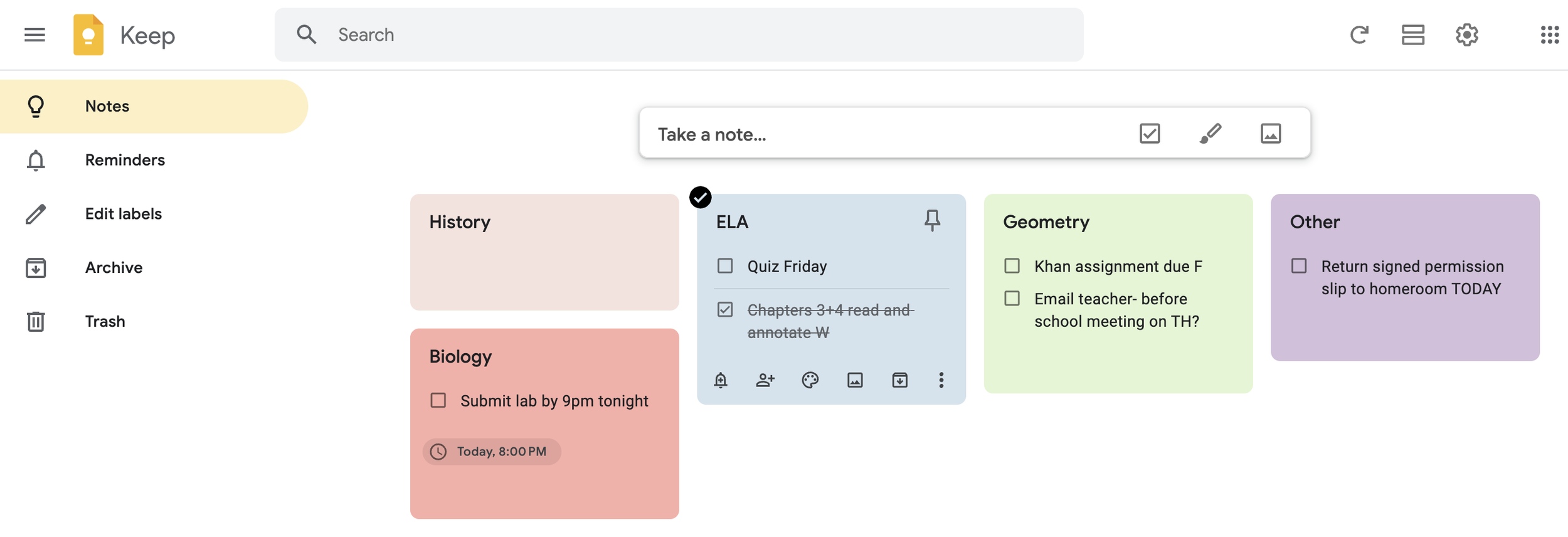
Quick guide to getting started!
-
Click in the "Take a note..." box. Type the name of your first class in the "Title". Click the three dots to show more options, and then click <Show checkboxes>. You can choose a background or color for your class by clicking the artist palette.
Repeat for all of your classes.
-
When you are given an assignment or need to document a to-do, simply click on the box of the class you want to update, and list the new item.
-
You can add a reminder for a specific task by clicking the task and selecting the alarm icon.
I encourage students to add the due date of each task to the task description.
-
Once you finish a task, check the box and you'll see it get crossed off. You can easily archive or delete finished tasks.
Tip: You can now add “collaborators” to notes to increase accountability. Hover over the box you want to share, then click the “add person” icon to share the note with a parent or teacher.